


Weather
OneLouder Apps
I usually judge a weather app by what happens when I need an answer quickly: Can I tell whether to leave now, what to wear, and whether a plan is likely to be disrupted without fighting the interface? After spending time with Weather from OneLouder Apps, I found an app that aims to make that decision straightforward rather than turning every forecast into a wall of information. It is a free weather app for Android, rated for Everyone, with a strong 4.7 average from around 199 thousand ratings and more than 50 million installs.
That popularity makes sense, but it does not mean the app will suit every person or every situation. Its appeal is strongest when you want a familiar forecast in a compact format and appreciate local detail. Its weaker side is that weather information can still become difficult to interpret when your vision, attention, hearing, motor control, or circumstances make a fast glance less practical. My experience was positive overall, though I would treat it as a useful everyday companion rather than a complete replacement for official emergency information.
How Weather Works for Different People and Situations
Readability and navigation at a glance
The first thing I noticed is that the app’s value depends on how quickly its forecast presentation becomes familiar. A weather application is not merely a collection of temperatures; it is a sequence of decisions. I want the current condition first, the near-term change next, and the broader outlook after that. Weather works best when I use it in that order instead of trying to absorb every available detail at once.
Related News

AccuWeather: Revolutionizing Mobile Meteorology

Stay Ahead of the Storm with Weather & Radar's Real-Time Tracking
Why the Weather App is Your Go-To for Accurate Forecasts
For readers who prefer a simple routine, that makes the app easy to approach. I can open it, identify the current situation, and then check whether rain, heat, cold, or changing conditions are likely to affect the next part of the day. The short description is simply “Weather,” which says little about the experience, but the actual usefulness comes from having a dedicated place to check local conditions rather than relying on a general search every time.
People with reduced vision may find the experience more comfortable if they use their phone’s own display-size, text-size, contrast, or magnification controls where available. I would not assume that changing system text settings will make every weather element perfect, because layouts can react differently across devices. The practical approach is to enlarge the interface before an urgent need arises, then check whether the forecast remains readable without excessive scrolling.
Related News

Instagram Is No Longer a Photo App. It Is an Attention Engine

Microsoft Teams Mobile: When Collaboration Becomes Navigation

How the NFL App Adapts to Android and iOS Updates

Temu: Elevate Your Shopping Experience to Billionaire Status

Why Traffic Rider Works Best as a Precision Reflex Game

How Google’s Find Hub Transforms Everyday Searches
I also recommend separating “quick check” information from details you only need occasionally. If I am deciding whether to walk to a shop, I do not need to study the entire outlook. If I am planning an outdoor appointment, I spend longer comparing the expected conditions across the relevant hours. This habit reduces cognitive load and makes the app more useful for people who become overwhelmed by dense forecast screens.
The app’s current version is 0.7.4.4, and that is worth keeping in mind when judging small interface differences between devices. Android phones do not all display controls in exactly the same way, especially when users apply large fonts, display zoom, or alternative navigation settings. I found the best experience came from treating the forecast as a short reading task: scan the main condition, confirm the timing, and only then inspect additional information.
Motor control, sensory needs, and practical interaction
Weather checking is usually a low-effort activity, but “low effort” is not the same as accessible for everyone. A person with limited dexterity may prefer a setup that avoids repeated tapping, precise gestures, or hurried interaction. My advice is to prepare the app when you are comfortable, rather than attempting to configure it while standing outside in rain or cold. A few seconds of preparation can make the daily check much less frustrating.
Gallery
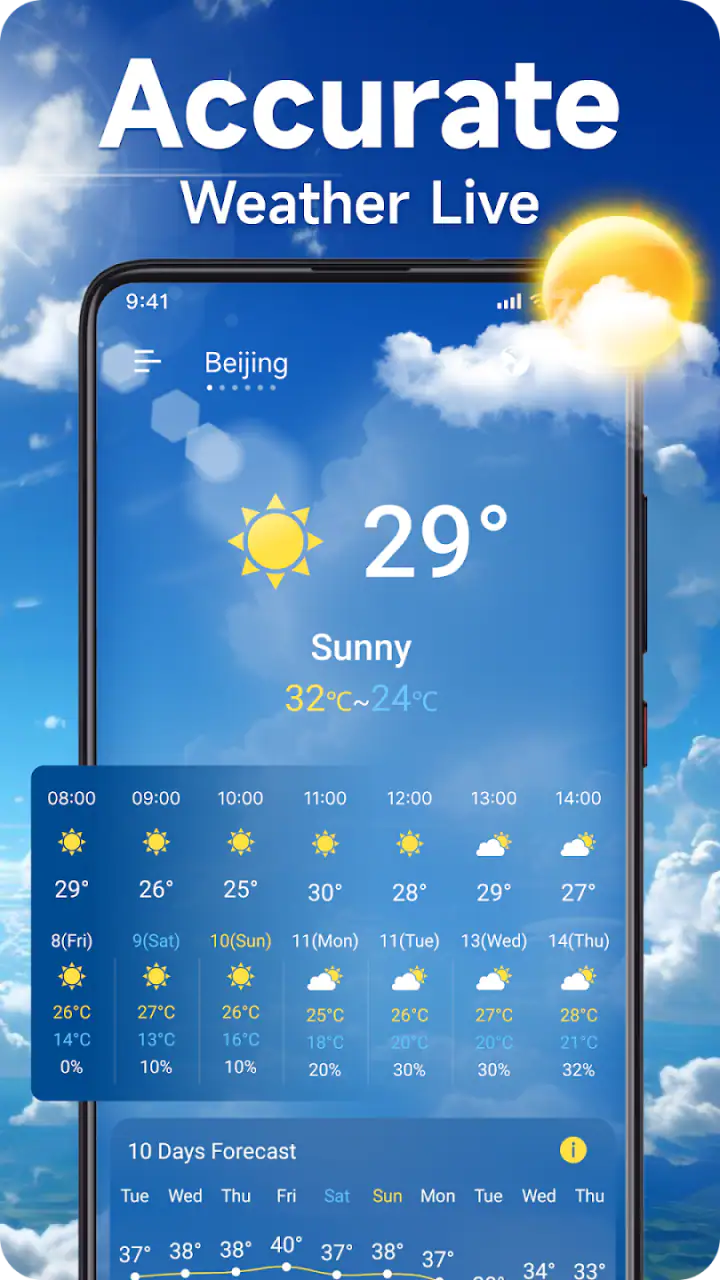
For users who are sensitive to visual clutter, the most helpful strategy is to decide what information matters before opening the app. Forecast screens can contain several kinds of weather information competing for attention. I personally focus first on the condition that changes my plan—rain, temperature, wind, or a major shift later in the day—and ignore secondary details unless they answer a specific question.
People who rely on hearing should be cautious about treating a visual weather app as their only route to information. A phone’s built-in screen reader or spoken-accessibility tools may help with readable labels, but the usefulness of spoken output can vary depending on how forecast elements are organized on the device. I would test the app with those tools during an ordinary day and not assume that every visual relationship will be explained perfectly through speech.
The same applies to people who cannot comfortably distinguish colors. Weather interfaces often use icons, color changes, or visual emphasis, but I would never use color alone to decide whether travel is safe. Read the accompanying wording and numbers, and compare the forecast with a trusted local source when the consequences matter. This is not a criticism unique to this app; it is a basic rule for interpreting weather information responsibly.
One useful workflow is to check the forecast before putting on outdoor clothing, then check again immediately before leaving if conditions are changeable. That helps users who need extra time to prepare, including people managing mobility equipment, children, medical needs, or temperature sensitivity. The app is most supportive in this context when it reduces uncertainty early, not when it is used as a last-second substitute for planning.
Situational access in ordinary life
A realistic example is a morning appointment across town. I open Weather before deciding whether to walk, take public transport, or allow extra time for uncomfortable conditions. I first look at what is happening now, then at the part of the day when I will return. That second check matters: a comfortable morning can become a difficult afternoon, and knowing that before leaving is more useful than reacting after the change begins.
For families, the app can support a simple shared routine. One person checks the forecast, another helps a child choose suitable clothing, and everyone has a clearer idea of whether outdoor plans may need adjustment. The benefit is not that the app makes the decision for you; it gives the household a common reference point. This can be particularly helpful when someone has difficulty describing weather conditions or processing several sources of information at once.
It is also useful for people working outdoors, commuting by bicycle, walking a dog, or managing a garden. In those cases, I would not just look at the current condition. I would compare the forecast with the time I expect to be exposed to the weather. That small change in habit turns the app from a passive display into a planning tool.
Travelers should be more careful. A local forecast can be helpful for deciding what to pack or when to leave, but an unfamiliar place may have conditions that change more quickly than expected. I would use Weather for orientation and then check official local warnings for serious hazards. The app’s role is strongest for everyday planning, not for making high-stakes decisions during severe weather.
The free price makes it easy to try without committing money, while in-app purchases range from $1.99 to $34.99 per item. That creates an important accessibility consideration: the basic experience may be approachable for someone on a tight budget, but optional purchases should be judged by whether they solve a real problem for you. I would not pay simply because a feature sounds convenient. First, I would use the free version long enough to learn whether its presentation fits my needs.
Where the experience still creates barriers
The biggest barrier is not necessarily a missing control; it is the possibility of information overload. Weather is deceptively complex. A screen can be technically readable and still be difficult to understand when several forecasts, symbols, and changing conditions appear together. I had to be deliberate about deciding which question I was asking. Without that discipline, it is easy to browse rather than find an answer.
Another limitation is the gap between forecast confidence and user expectation. People often want a definite answer—whether it will rain at a particular moment, for example—but weather information is an estimate. The app can help me plan, yet it cannot remove uncertainty. For someone whose safety or health depends heavily on conditions, I would pair it with local alerts, official guidance, or another source rather than depending on one screen.
Users with motor difficulties may also encounter friction if they need to scroll, select, or adjust something precisely while moving. My workaround is simple: check conditions indoors, use a larger display setting if needed, and avoid making the app part of a rushed departure routine. This sounds obvious, but it is the difference between an accessible habit and an inaccessible one.
People with low vision, color-vision differences, or reading difficulties should test the app with their preferred phone settings before relying on it. System-level accessibility tools can improve the experience, but they do not guarantee that every forecast element will be equally clear. I would also avoid interpreting icons without text, especially when deciding whether a plan involving travel, exercise, or vulnerable people should go ahead.
There is a broader barrier for anyone who needs highly specialized weather information. A general weather app is convenient, but a professional user may need more detailed observations, industry-specific data, or official warnings. In that case, a dedicated service may be a better choice. Weather is aimed at everyday users who want a practical local update, not at replacing every specialist source.
How it compares with familiar alternatives
Compared with checking weather through a search engine, Weather feels more purposeful. A search result can answer one question quickly, but it may require repeated searches when I want to compare the current situation with later conditions. A dedicated app gives me a consistent place to return to, which is valuable for routines and for people who benefit from predictable navigation.
Compared with a phone’s built-in weather panel, the choice is more personal. A widget or system panel is excellent when I only need a glance, especially if opening an app is physically or cognitively tiring. Weather becomes more appealing when I want to spend a little longer with the forecast and prefer a dedicated weather experience. If your priority is the fewest possible interactions, the built-in option may remain better.
Compared with radar-focused or severe-weather applications, Weather is easier to justify for ordinary daily planning. I would choose a specialist tool when I need to follow a storm’s movement closely or make decisions based on official warnings. I would choose this app when I want a straightforward local check before commuting, shopping, exercising, or arranging an outdoor plan.
That distinction also helps answer whether it is suitable for children or older adults. The Everyone rating makes it broadly appropriate from a content perspective, but suitability still depends on the person’s reading ability, vision, motor control, and comfort with phone navigation. I would show a family member the exact routine—open, read the main condition, check the relevant time, close—rather than assuming the app will be self-explanatory for every user.
My inclusive verdict after everyday use
OneLouder Apps has made a weather app that I find most convincing as a dependable daily checkpoint. Its large user base—over 50 million installs—suggests that it has reached far beyond a niche audience, and the 4.7 average from around 199 thousand ratings is consistent with an experience many people find useful. Those figures do not guarantee that it will meet your accessibility needs, but they do show that the app has become a familiar option for a broad range of Android users.
I would recommend it to someone who wants a free, local weather tool for practical decisions and is comfortable using their phone’s standard accessibility settings when necessary. I especially like it for routines: checking before a commute, planning a dog walk, preparing for an appointment, or deciding whether outdoor work needs a different time. The strongest tip I can offer is to create a two-check habit—once while planning and once before leaving—rather than expecting one glance to cover the whole day.
I would suggest skipping it if you need a highly specialized weather service, depend on fully spoken interaction without testing the interface first, or want every decision reduced to a single unmistakable signal. In those cases, a built-in widget, an official warning source, or a specialist weather tool may be more appropriate. I would also be careful with optional purchases: try the free experience first and spend only if an added function clearly improves your own workflow.
Overall, Weather is accessible in the practical sense that it can fit many different routines, but its success depends on how each person reads and uses the forecast. It does not remove the need for judgment, and it should not be the only source during dangerous conditions. Still, for everyday planning, I found it clear enough to become a useful habit, flexible enough for different contexts, and easy to recommend to a friend who wants weather information without unnecessary ceremony.
As an app from OneLouder Apps, it occupies a sensible middle ground: more intentional than a quick web search, less specialized than a professional weather service, and free to try on Android devices running version 7.0 or later. That balance is why I would keep it installed, provided its text, controls, and forecast presentation remain comfortable for the individual using it.
FAQs for Weather
What features does the Weather app offer?
The Weather app provides real-time weather updates, a 7-day forecast, interactive radar maps, and severe weather alerts. Users can also access detailed information on temperature, humidity, wind speed, and UV index. Customizable notifications ensure you stay informed about weather changes throughout the day.
Is the Weather app free to use?
The Weather app is available for free with basic features. However, it offers a premium version that includes additional features like ad-free browsing, extended forecasts, and advanced radar capabilities. Users can choose the plan that best suits their needs after a free trial period.
How accurate is the Weather app’s forecast?
The Weather app uses data from multiple reliable sources, including meteorological services and satellite data, to provide accurate weather forecasts. While no app can guarantee 100% accuracy, this one employs advanced algorithms and regular updates to deliver precise and timely information for your location.
Can I customize the notifications in the Weather app?
Yes, the Weather app allows you to customize notifications according to your preferences. Users can set alerts for severe weather, daily forecasts, and specific weather conditions like rain or snow. These settings ensure that you receive relevant updates without unnecessary disruptions.
Is the Weather app available on both Android and iOS devices?
Yes, the Weather app is available for download on both Android and iOS platforms. It ensures a seamless experience across devices, with intuitive design and easy navigation. Users can download it from the Google Play Store for Android or the Apple App Store for iOS.
Pros
- Accurate real-time updates.
- Wide range of weather details.
- User-friendly interface.
- Customizable alerts.
- Supports multiple locations.
Cons
- Occasional ad interruptions.
- Limited offline functionality.
- Some features require premium.
- Battery consumption can be high.
- Data refresh can be slow at times.


